// securidigm scout

Scout listens to your network and tells you, in plain English, what’s on it and what’s wrong.

Scout reads a copy of your network traffic. It builds your equipment list and network map, flags known weaknesses and risky activity, and gives you reports you can hand to your Coast Guard or TSA reviewer. It is built on widely used free tools: Zeek and Suricata (open-source network monitors), with the industrial-protocol add-ons made for CISA by Idaho National Laboratory.

Running an ordinary office rather than a control network? See Scout for offices, with Baseline.

What Scout shows you A network map with an office network and a control network. Scout sees an office PC sending a Modbus write to the crane controller across the boundary, and a vendor connecting in from the internet, and reports both in plain English: a write to a controller from another network, and outside remote access that is not on your allowed list, both rated high. Internet // office network // control network Office PC Engineering laptop Crane PLC Gate PLC Operator screen Modbus write vendor remote access // high · cross-network writeOffice PC sent a Modbuswrite to the crane PLC.What to do: check it was planned // high · remote accessVendor connection noton your allowed list.What to do: confirm with vendor
Illustration: Scout's network map flags an office PC writing to a controller and a vendor connection that isn't on the allowed list.

// passive

It only listens

Scout reads a copy of the traffic and never sends anything to your controllers. Its monitoring ports can’t transmit.

// offline

Nothing leaves your building

No internet, no “phone home,” no account with us, no remote access by us. Updates are signed files you load yourself.

// encrypted

Locked when it’s off

On the dedicated box, the disk is encrypted with a passphrase you choose. Files Scout exports for Harbor, Signal and Baseline are encrypted too.

// plain english

Alerts you can act on

Each finding says what Scout saw and what to do next. Reports say plainly which work needs an outside firm.

// see scout work

Watch Scout work

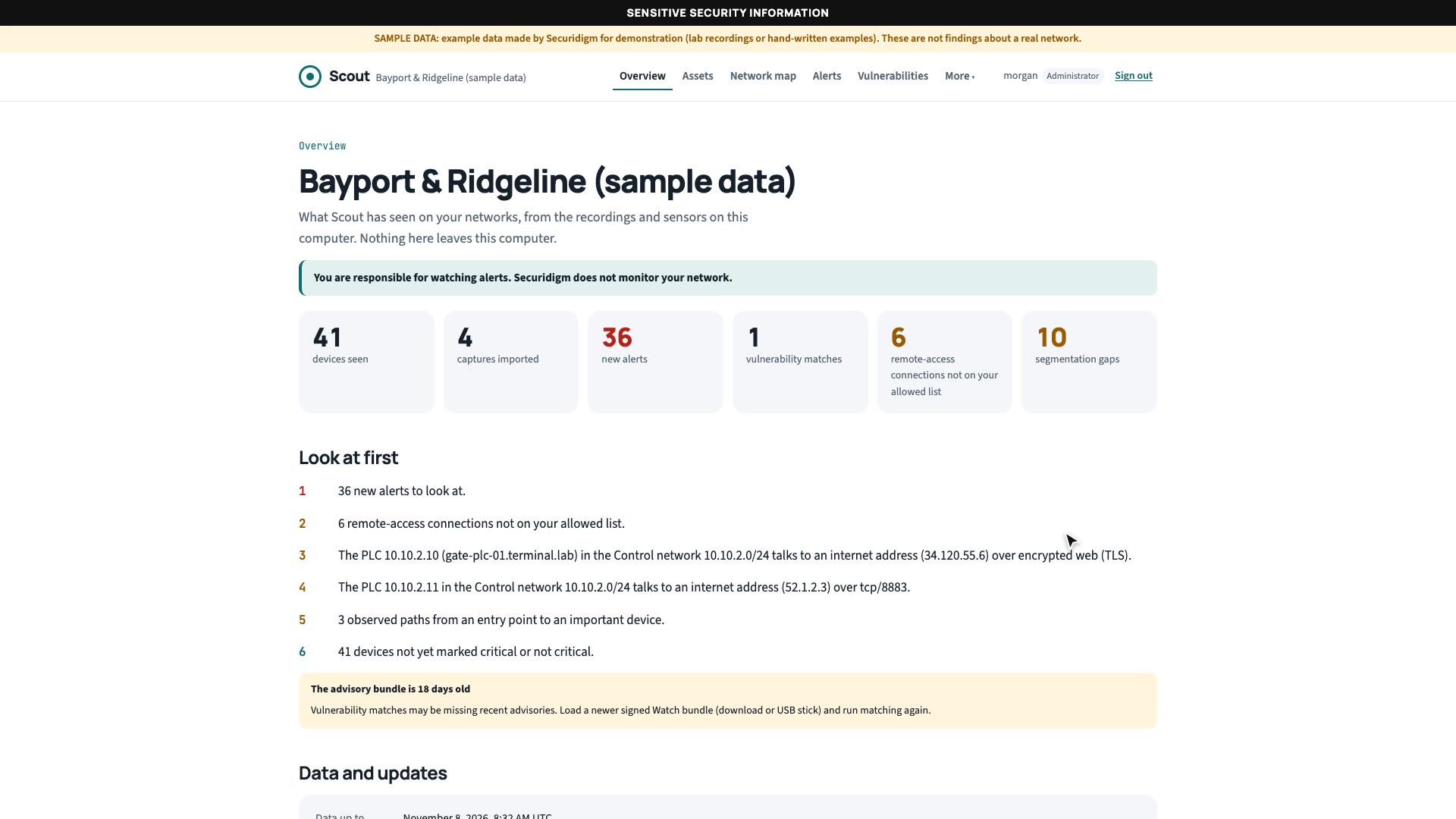
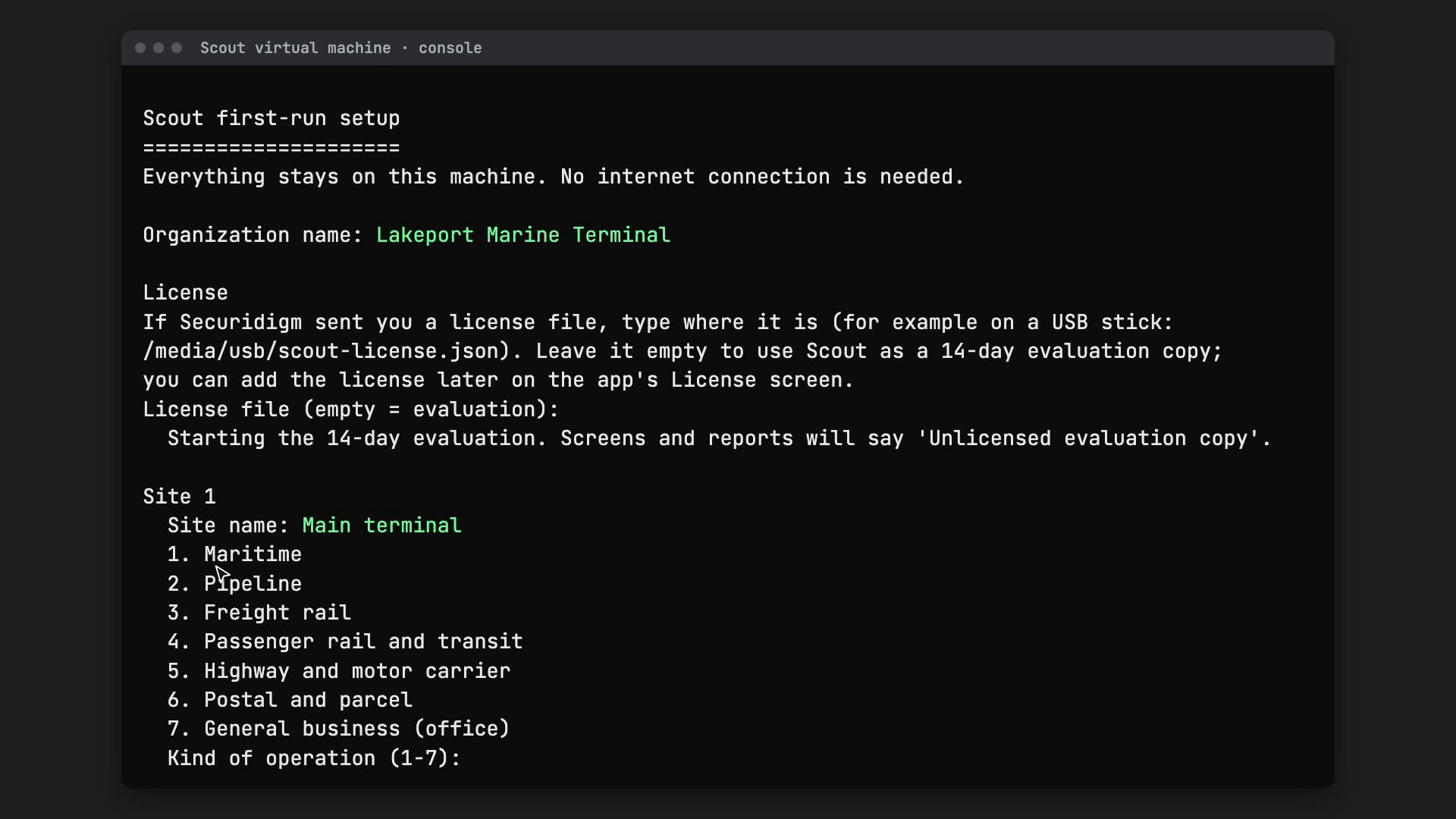
A narrated tour of Scout on a sample port terminal and pipeline: the equipment list, alerts in plain English, the network map, and the reports for your Coast Guard or TSA reviewer. Beside it: how to install Scout as a virtual machine.

// why it matters

Most control networks have no one watching them.

U.S. government reports keep finding the same things: office and control networks that aren’t kept apart, remote access that attackers use, and too little monitoring to notice.

94.4%

“The USCG found that 94.4% of their assessed entities had default passwords in place.”

U.S. Coast Guard findings in CISA Analysis: Fiscal Year 2023 Risk and Vulnerability Assessments, September 2024 (CISA, PDF)

Scout flags default SNMP passwords and remote logins sent unencrypted that it sees on your network.

71%

“There was a 71% year-over-year increase in the use of stolen or compromised credentials in reported cyber incidents”

U.S. Coast Guard, on its 2024 maritime cyber trends report, May 19, 2025 (Coast Guard)

Scout lists every remote and vendor connection it sees, and flags sign-ins from new places.

5 years

“maintaining access and footholds within some victim IT environments for at least five years”

CISA, NSA and FBI advisory AA24-038A, February 7, 2024, on intrusions that included the Transportation Systems sector, using tools already built into the systems (CISA)

Scout watches the network itself, so it doesn’t depend on software installed on each computer.

IT → OT

“Insufficient network segmentation configuration between IT and operational technology (OT) assets”

CISA and U.S. Coast Guard threat hunt at a US critical infrastructure organization, advisory AA25-212A, July 31, 2025 (CISA)

Scout maps your zones and flags traffic that crosses between them.

Unseen

“The red team’s activities generated security alerts that network defenders did not review.”

CISA red team assessment, advisory AA24-326A, November 21, 2024 (CISA)

Scout writes alerts in plain English that a small team will actually read.

VNC

“minimally secured internet-facing virtual network computing connections”

Pro-Russia hacktivists’ way in, per joint advisory AA25-343A, December 9, 2025 (cyber.gov.au copy). VNC is a remote screen-control tool.

Scout flags unencrypted remote control and devices talking to the internet.

41% of successful attacks in CISA’s assessments used valid accounts: “Valid Accounts [T1078] were the most common successful attack technique, responsible for 41% of successful attempts.” CISA Analysis: FY2023 Risk and Vulnerability Assessments, September 2024 (CISA, PDF).

“OT devices are easy targets when connected to the internet.” CISA, the FBI, EPA and DOE also name default passwords, insecure remote access and unsegmented networks. Fact sheet “Primary Mitigations to Reduce Cyber Threats to Operational Technology,” May 6, 2025 (CISA, PDF).
How it works

Scout never joins your control network as a participant. A standard switch feature, the mirror port, copies the traffic to Scout; or you record a week of traffic and bring us the recording.

How Scout gets a copy of your traffic Your controllers and office computers talk through a network switch. The switch's mirror port sends a one-way copy of the traffic to Scout. Scout sends nothing back to the network. Scout produces your equipment list, network map, findings and reports, and sends alerts through your own email or chat. Controllers (PLCs, RTUs) Office and HMI computers Your switch mirror port copy, one way Scout listen-only, offline You get • Equipment list • Network map and zones • Findings, worst first • Reports for reviewers • Alerts to your own email How Scout gets a copy of your traffic Your controllers and office computers talk through a network switch. The switch's mirror port sends a one-way copy of the traffic to Scout. Scout sends nothing back. Scout produces your equipment list, network map, findings and reports. Controllers Office / HMI PCs Your switch mirror port copy, one way Scout listen-only, offline You get • Equipment list and network map • Findings, worst first • Reports for reviewers • Alerts to your own email
Scout only receives. It has no way to send traffic back into your control network.

What Scout finds

From the traffic alone, with nothing installed on your controllers.

Your equipment list

Every device Scout sees: address, network-card maker, the languages it speaks, and a guess at its role (controller, operator screen, engineering laptop). Make and model where the traffic reveals them. You confirm, correct and mark the critical ones.

Ready

Risky commands to controllers

Someone writing new values to a controller, loading a new program, or restarting it. Scout raises these as alerts and explains them.

Ready for every language in the list below

Remote access

Remote desktop, VNC, SSH, VPNs and common vendor tools such as TeamViewer and AnyDesk. Scout lists each outside and vendor connection and checks it against the list you allow.

Ready

Common problems

  • Passwords sent in plain text
  • Old Windows file sharing (SMBv1)
  • Devices talking to the internet
  • Weak encryption and bad certificates
  • Unencrypted remote control (Telnet, VNC)
Ready

Zones and approved connections

A map of your office and control zones and the paths between them. Scout flags gaps in plain words, such as “Office PCs talk directly to the crane PLCs (Modbus),” and shows paths from the internet or a vendor link to a controller.

Ready

Known weaknesses

Load the signed advisory file from Securidigm Watch (by download or USB stick) and Scout lists which of your devices have known weaknesses, starting with those attackers are already using.

Ready where make and model are known

Evidence your regulator asks for

Scout doesn’t make you compliant. It helps you show what your Coast Guard or TSA plan says you do, with evidence from your own traffic. Rule text below is quoted from the published rules.

TSA Security Directive Pipeline-2021-02G and Rail 1580/82-2022-01E · section III.B.1.b (pipeline, PDF · rail, PDF)

All external connections to the Operational Technology system

Helps you show: every connection Scout saw between your control network and the outside world, including vendor and remote access.

TSA Security Directives, same two · section III.D.2.b

Document and audit any communications between the Operational Technology system and an external system that deviates from the Owner/Operator’s identified baseline of communications

Helps you show: new connections Scout alerts on after its learning period, and remote connections not on your allowed list. Dated snapshots show what changed between analyses, in a “What changed” report.

TSA Security Directives, same two · section III.G.2.b (architecture design review)

verification and validation of network traffic and system log review and analysis to identify cybersecurity vulnerabilities related to network design, configuration, and inter-connectivity to internal and external systems

Helps you show: Scout’s findings report is a review of your network traffic. It supports this review; it does not replace your assessor.

Coast Guard, 33 CFR 101.650(b)(3) (eCFR)

Maintain an accurate inventory of network-connected systems, including designation of critical IT and OT systems

Helps you show: the equipment list Scout builds from traffic, with the devices you marked critical.

Coast Guard, 33 CFR 101.650(f)(3)

Monitor and document all third-party remote connections

Helps you show: Scout’s remote-access list: who connected from outside, with which tool, and whether you allow it.

Coast Guard, 33 CFR 101.650(e)(3)(v)

no OT is connected to the publicly accessible internet unless explicitly required

Helps you show: control devices Scout saw talking to the internet, so you can fix them or record why they must.

Plain limit. Scout listens; it doesn’t scan or test. Rules that call for vulnerability scans or penetration tests still need that work, and Scout’s reports say so. Nothing here is legal advice.

How you get it

Start with a recording, with nothing installed on your network. Move to an always-on box when you’re ready.

Bring a recording

Your IT person plugs a laptop into the switch’s mirror port and records about a week of traffic. Scout analyzes the recording on a separate computer. Nothing of ours touches your network. This is Scout Capture.

Ready, with a guided import and step-by-step recording guide

Virtual machine

A ready-made Scout image that runs on a computer you already have. About 16 GB of memory recommended.

Ready on Intel MacsWindows and Apple-chip Macs: in testing

Dedicated box

A small box from our published parts list, plugged into a mirror port or a one-way network tap that physically can’t send anything back. Watches all the time and sends alerts to your own email or chat. You watch your alerts; we don’t.

Ready: tested in our lab; first physical boxes being tested

Control-system languages Scout reads

Controllers speak their own network languages (protocols). Scout reads these to learn what each device is and what is being asked of it.

  • Ready read now, with warning rules
  • ModbusPipelines, terminals, everywhereReady
  • DNP3Pipeline SCADA, utilitiesReady
  • EtherNet/IPRockwell / Allen-BradleyReady
  • S7SiemensReady
  • BACnetBuildings, terminalsReady
  • OPC UAOperator screens, historiansReady
  • BSAPPipeline (Emerson)Ready
  • ROC PlusPipeline flow computersReady
  • GenisysRail signalingReady
  • HART-IPField instrumentsReady
  • PROFINETSiemens, cranes, sortationReady
  • GE SRTPGE controllersReady
  • Omron FINSOmron controllersReady
  • IEC 60870-5-104Pipeline SCADA, rail traction powerReady
  • NMEA 0183 / IEC 61162-450Vessel bridge: GPS, AIS, autopilot, ECDISReady
  • Veeder-Root tank gaugesFuel terminalsReady
  • MQTTConnected sensors and gatewaysReady
  • LLDP / CDPSwitch make, model and softwareReady

Each one was checked on real recordings in our lab with the same engines that ship in Scout. Where no free simulator exists, we used the sample recordings that come with each protocol reader. Scout also recognizes VPNs (OpenVPN, WireGuard, IPsec), historians, serial-to-network converters and CODESYS controllers. Rail signaling and train-control systems (ATCS, PTC) have no free readers; Scout says so plainly where it can’t read something.

How Scout compares

Scout is built on the same free tools anyone can download. What you pay for is the work they leave to you: setup, reading the results, and turning them into proof your Coast Guard or TSA reviewer accepts.

$129,180

a year: what a typical security analyst earns, the kind of expert the free route needs.

Median yearly pay for information security analysts, May 2025. U.S. Bureau of Labor Statistics, Occupational Outlook Handbook (BLS)

$6,500

once, for Scout Site: one facility, all features, answers in plain English and reports for your reviewer.

What it takes to get answers from a network recording
The workFree tools aloneScout
SetupAssemble the monitors and industrial add-ons, then tune themA ready-made image and a short setup wizard
Reading the resultsThousands of log lines and alerts; you decide what mattersPlain-English findings ranked high, medium or low, with what to do
Control equipmentYou learn each industrial protocol yourselfRecognizes the industrial protocols and names the device types
Proof for your reviewerWritten by hand, every timeReports organized by Coast Guard, TSA or NIST CSF 2.0 section
Keeping currentYou track new advisories yourselfUpdates and a signed known-bad list from Watch, still offline
HelpCommunity forums; CISA's free toolkit has no paid supportEmail support for the first year; renewal optional

All three kinds of option, compared fairly. Each one is right for someone.

// free toolkits

Free government and open-source toolkits

What it is
Free, capable toolkits, including one published by CISA, built from the same free parts Scout uses.
The catch
Needs a skilled engineer to set up and read. No paid support of any kind (CISA). No Coast Guard or TSA reports.
Best for
Teams with security engineers on staff.

// big platforms

Enterprise OT security platforms

What it is
Mature, full-featured platforms with strong threat detection and large research teams.
The catch
Sold by yearly subscription, mostly by quote. Public price lists we reviewed (November 2026) show about $40,000–$100,000+ a year for the central software, plus about $4,000–$10,000 a year per sensor and $3,000–$13,000 of hardware per sensor.
Best for
The largest operators with budget and staff.

// built for everyone in between

Scout

What it is
The same free parts, packaged with plain-English answers, support, and reports for your Coast Guard or TSA plan.
The difference
No expert needed. Offline, no cloud account. Posted prices, paid once.
Honest gap
Threat detection is the big vendors’ strongest area; Scout starts simpler and grows.

Prices

One license per organization, paid once. First year of updates and email support included; after that, optional renewal at 20% a year. A site is one facility, terminal, yard or depot; every 3 vessels count as one site. Sensor hardware is yours, from our published parts list: from about $1,100 (budget) or about $4,500 (rugged) per sensor, or about $250–$300 for an office.

Scout license tiers (one-time price; yearly renewal optional)
TierCoversLicenseYearly renewal
Scout CaptureRecordings only, up to 3 sites$2,500$500
Scout Site1 site, all features, up to 2 sensors$6,500$1,300
Scout Multi-site2–5 sites or up to 15 vessels, up to 10 sensors$14,500$2,900
Scout Regional6–15 sites or up to 45 vessels, up to 30 sensors$24,000$4,800
More than 15 sitesQuotedQuoted20%
Extra sensorAny tier with sensors$1,000$200
Scout for offices1 office, 1 sensor, up to 100 employees; office checks (details)$1,500 with Baseline · $1,950 without$300 · $390
  • Upgrades: move up a tier any time by paying the difference between the two current prices; your renewal date stays the same. Scout Capture’s $2,500 counts in full toward Site or Multi-site if you upgrade within 12 months.
  • Renewal is never automatic. If you stop, Scout keeps working with what it has. Renew any time at the current 20% rate: no back-pay, no penalty for coming back.
  • Try it free: any copy of Scout runs as a 14-day evaluation on your own recording, with every screen and report marked “evaluation”.

// how they fit with securidigm’s compliance apps

Scout finds it. Your compliance app records it.

Harbor, Signal and Baseline are Securidigm’s offline compliance apps: the plan and the paperwork. Scout gives each one proof from the network.

// coast guard · 33 CFR 101 Subpart F

Harbor

For ports, terminals and vessels. Scout’s equipment list, network map, third-party connections and risk items support Harbor’s registers and your Cybersecurity Plan.

Scout reports: readyDirect import into Harbor: on request

// tsa · pipeline and rail directives

Signal

For pipelines and railroads. Scout’s equipment list and connection evidence support your Critical Cyber Systems list, segmentation and monitoring sections.

Scout reports: readyDirect import into Signal: on request

// nist csf 2.0 · small businesses

Baseline

For small businesses. Scout’s office mode lists every device on the office network and links each finding to the CSF 2.0 outcome it supports, such as asset inventory (ID.AM) and continuous monitoring (DE.CM). See Scout for offices.

Office mode: available now$1,500 with BaselineDirect import into Baseline: on request

Today Scout prints reports and writes an encrypted export file for each app. The apps learn to open that file when a customer asks for it.

// see it on your own traffic

Request a demo

We’ll walk you through Scout on a sample network, and explain how to record a week of your own traffic safely. No sales pressure, no account to create.

Low-risk first step: Scout Capture, with nothing installed on your network.

Tell us about your operation

Opens your own email program with the request filled in; nothing is sent until you send it. Or write to michael@securidigm.com.